🧩 ACF Blocks Usage Guide
ACF blocks are Gutenberg blocks with additional ACF functionality added to them. These are used inside the Gutenberg visual editor inside WordPress. This guide explains how ACF (Advanced Custom Fields) blocks work in our WordPress starter kit, using the image-and-content block as a reference.
ACF JSON
ACF will be able to sync and work with the different acf-json files in the project. Inside themes/theme/acf-json you are able to set-up a field group using a json file. (test.json is included as an example).
You can also manually set the ACF field group in the backend like usual and this will save a json inside the acf-json folder as well. This is really great for syncing ACF fields between colleagues and environments.
Even more beautiful, when ACF detects changes in one of the json files, you will be able to sync this newer data into the website. ACF detects this via the "modified" attribute inside the json.
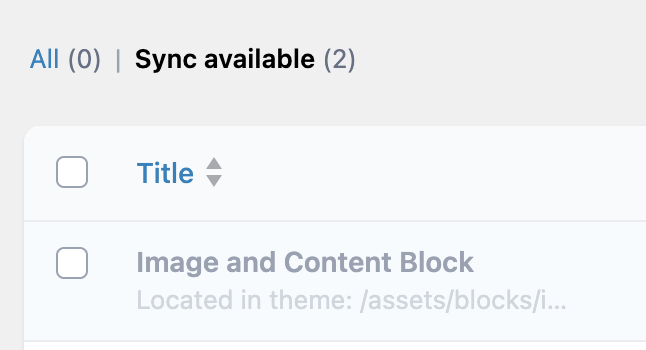
Scripts have been added so that json files inside /assets/blocks/{block-name} are also included in this functionality.
📂 Block Structure
This means we can keep all data belonging to an ACF Block in one folder. This also makes it easier for sharing components in future projects.
All ACF blocks follow a standard directory layout:
assets/blocks/{block-name}/
├── block.json        # Block registration & metadata
├── {block-name}.php  # Block template (rendering logic)
├── {block-name}.scss # Block styles (BEM)
├── {block-name}.js   # JS entry point (also imports SCSS)
└── {block-name}.json # ACF field group definition
⚙️ Key Components
1. Block Registration (block.json)
{
  "apiVersion": 2,
  "name": "acf/image-and-content",
  "title": "Image and Content",
  "description": "A flexible two-column layout with image and WYSIWYG content",
  "category": "layout",
  "icon": "columns",
  "supports": {
    "align": ["wide", "full"], //not used, for now
    "spacing": {
      "margin": true,
      "padding": true
    }
  },
  "acf": {
    "mode": "auto",
    "renderTemplate": "image-and-content.php"
  },
  //editorStyle loads the css inside the visual editor
  "editorStyle": "file:../../../dist/css/image-and-content.css"
}
2. Block Template {block-name}.php
{block-name}.php contains the rendering logic, the PHP of the ACF Block.
Enqueue_vite_entry()
On the first line, enqueue_vite_entry() needs to be run. Enqueue_vite_entry() is a custom function that conditionally loads CSS/JS assets for blocks through Vite's build system - it only loads the assets when the specific block is actually being rendered on a page, improving performance by avoiding unnecessary asset loading.
The function handles both development mode (with Vite's dev server) and production mode (with compiled assets), preventing duplicate enqueueing through a static tracking array.
3. ACF Field Group {block-name}.json
The {block-name}.json file defines all the ACF field values of the component.
⚡ Automatic Block Registration
add-custom-blocks.php automatically discovers and registers all ACF blocks by scanning the /assets/blocks directory for folders containing a block.json file, then registers both the block types and their ACF field groups without requiring manual registration code for each new block.
function register_acf_blocks() {
    $blocks_path = get_template_directory() . '/assets/blocks';
    foreach (glob($blocks_path . '/*', GLOB_ONLYDIR) as $dir) {
        if (file_exists("$dir/block.json")) {
            register_block_type($dir);
        }
    }
}
🛠 Creating a New Block
Run (in theme root):
node scripts/create-block.js
This:
- Prompts for block slug & name
- Copies template files from
/dev-tools/environment-files/wordpress/templates/block/ - Replaces placeholders
- Creates full block structure
✅ Best Practices
Security
- Use
get_field()for ACF data - Escape output (
wp_kses_post,esc_html__) - Use
get_block_wrapper_attributes()
Performance
- Load assets only when the block is present via
enqueue_vite_entry() - Optimize images +
loading="lazy" - Cache expensive queries
Accessibility
- Always set alt text
- Use semantic HTML
- Test keyboard navigation & screen readers
CSS
- BEM naming
- Scoped to block root class
- Mobile-first responsive design